
Chrome extension
RhymeForge Rhyme Finder
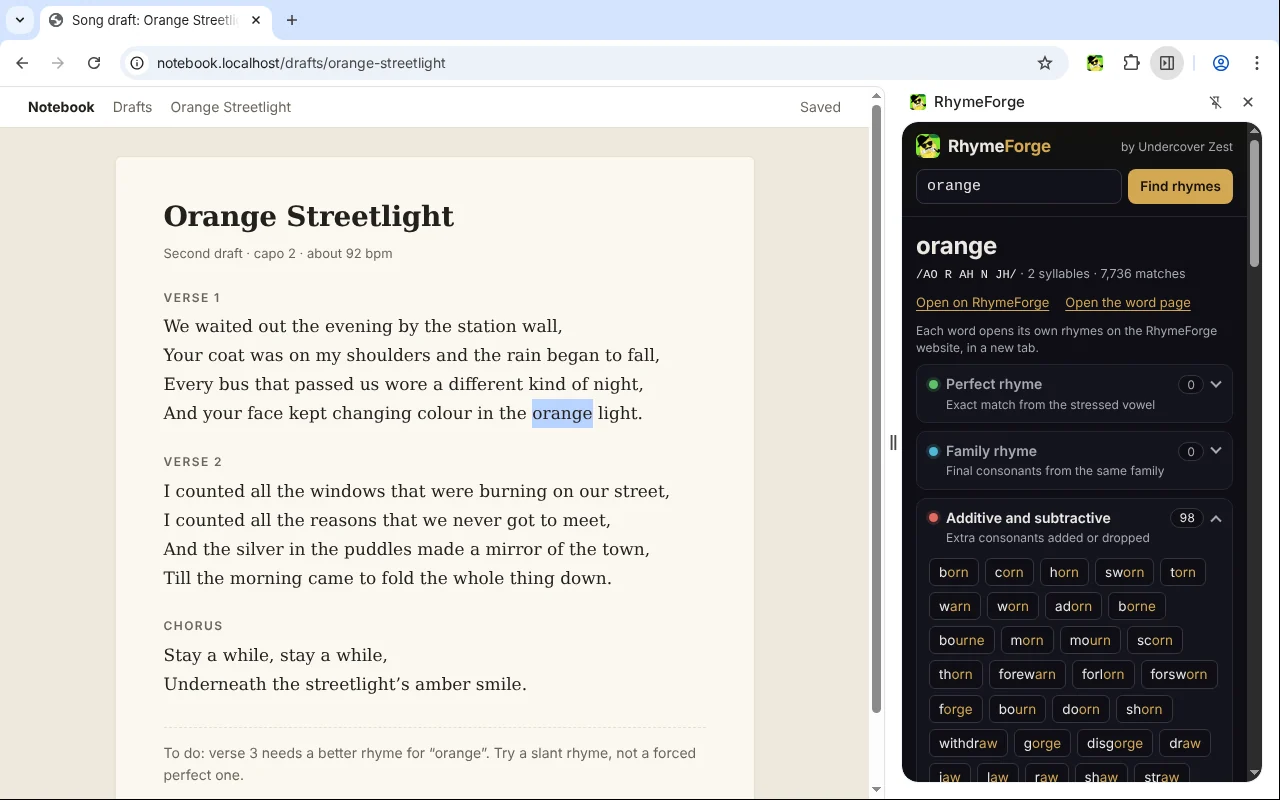
Select a word on any web page, right-click it and choose Find rhymes. The word’s rhymes open in a side panel next to the page, grouped the same way as on the RhymeForge website.
Coming soon to the Chrome Web Store
Use RhymeForge in your browser
Free. No sign-up. Works offline. For Google Chrome 116 or later.
How it works
- Select a wordon any page: an article, a poem or your own lyrics.
- Right-click itand choose “Find rhymes for …”.
- Read the rhymesin the side panel. Look up another word and the panel updates.
You can also click the RhymeForge icon in Chrome’s toolbar and type any word.
What you get
- The same rhyme engine and dictionary as RhymeForge, with nearly 54,000 words.
- Rhymes grouped by type: perfect, family, additive and subtractive, assonance, ending and consonance.
- A link from every rhyme to its own results on RhymeForge, and to the word page for common words.
- Phrases rhyme on their last word, as on the website, and you can switch to any other word you selected.
- It works offline, because everything it needs is inside the extension.
Privacy
No account, no analytics and no tracking. The extension only sees the text you choose to look up, works out the rhymes on your device and makes no network requests. Links to RhymeForge open only when you click them. Read the privacy policy.
Permissions
- Context menus
- Adds “Find rhymes” to the right-click menu when you select text.
- Side panel
- Shows the rhymes next to the page you are reading.
- Storage
- Passes the selected word to the side panel. It is held in memory and cleared when Chrome closes.
Questions and support
- Is it free?
- Yes. There is no sign-up and no paid version.
- Which browsers does it work in?
- Google Chrome 116 or later, on Windows, macOS, Linux and ChromeOS.
- The “Find rhymes” item does not appear.
- Check that some text is selected first. Some sites and web apps replace Chrome’s right-click menu with their own, and Chrome does not show extension menu items on its own pages, such as Settings or the Chrome Web Store. In those places, click the RhymeForge icon in the toolbar and type the word instead.
- A word is not in the dictionary.
- The extension still finds rhymes by guessing the pronunciation from the spelling, and tells you it has done so. If you think a word should be added, email it to us.
- Anything else?
- Email luke@undercoverzest.app.